

A virtual reality attraction can become the busiest corner of a family entertainment center, or an expensive machine that sits idle. The difference usually comes down to planning: picking the right type of attraction, giving it the right space and running it with clear safety and cleaning routines.
This guide explains what a commercial VR attraction is, the main types available, and how a venue chooses one, lays out the space and runs it well day to day.
What a VR Attraction Is
Every VR attraction is built from the same three parts. A headset shows each player a 3D world. A tracking system follows the player’s head, hands and sometimes feet or body, so their movements carry into the game. The content, meaning the games and experiences themselves, ties it all together.
What separates a commercial attraction from a home headset is everything around those parts: hardware built for constant use by many different people, software that manages sessions and players, and a physical setup designed for safety and steady throughput.
The Main Types of VR Attractions
- Single-player stations. One player in a marked, enclosed area. Compact and simple to supervise, but each station serves one guest at a time.
- Motion simulators. Seats or standing platforms that tilt, move or vibrate with the experience. Players stay in one place and sessions are usually short.
- Multiplayer arenas. Several players share one virtual world, each in their own play spot or moving around a shared tracked area. Strong for groups and parties.
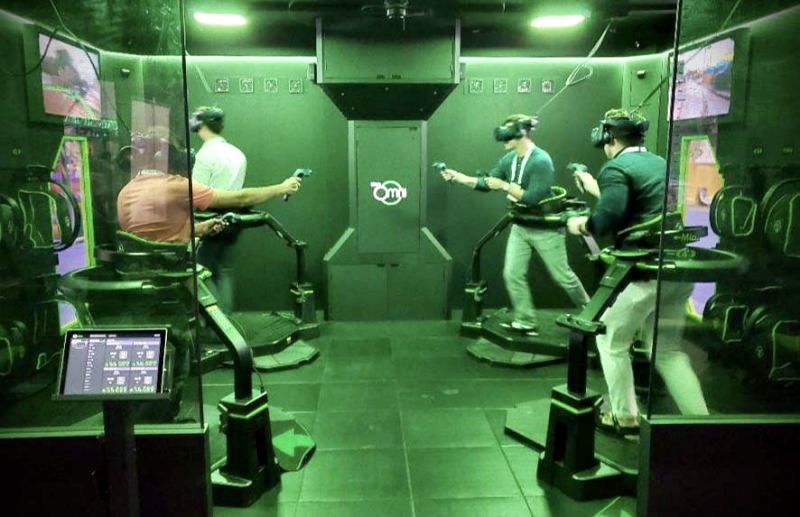
- Locomotion platforms. Players walk or run in place, held by a support ring or harness, so they can cover ground in the game without a large room.
- Free-roam spaces. Teams walk through a large open area together. These give the most freedom and need the most floor space and supervision.
Choosing the Right Attraction for Your Venue
Start with your guests and your floor plan, not the hardware. These questions narrow the choice quickly:
- Who will play? Teens and adults suit competitive arenas. Mixed family groups may get more from seated or shared experiences, within the age guidance for the equipment.
- How many guests per hour? Multiply players per session by sessions per hour to see whether the attraction can keep up on your busiest days.
- How will you charge? Per session, as part of admission, in party packages or a mix. Your pricing model affects how much capacity you need.
- How will content stay fresh? Ask how new games are added, how often, and whether there is a recurring license fee.
- What support comes with it? Find out who trains your staff, who services the hardware and what the warranty covers.
Planning the Space
VR needs more room than the equipment’s footprint suggests. When you lay out the area, plan for:
- A safety buffer. Players cannot see the real room, so keep walls, posts and onlookers well outside arm’s reach. Padded walls or barriers help in arenas.
- Overhead clearance. Some systems hang sensors or cable management from above, and motion rides need room to move.
- Lighting and surfaces. Some tracking systems are affected by direct sunlight, mirrors or very shiny surfaces, so ask what the system needs.
- Power and network. Plan outlets, a charging station for wireless headsets and a reliable network connection for the session software.
- A queue and briefing area. Guests need a place to wait, watch and hear the rules before they play, and theming can make the line part of the experience.
- Comfort. Headsets get warm, so good ventilation helps, and a seat nearby gives anyone who feels unwell somewhere to recover.
Make sure guests who use wheelchairs can reach both the attraction and the viewing area. The accessible design standards for public venues are published on ada.gov. With 3D design and site planning from A-OK Playgrounds, you can place VR alongside indoor play designs and other features before anything is ordered.
Safety and Hygiene Routines
A headset hides the real world, so safety depends on the people running the attraction. Build these steps into every session:
- Check each guest against the manufacturer’s age, height and health guidance, and post that guidance where guests can read it.
- Give a short briefing on staying inside the play area, speaking up at the first sign of dizziness and how to stop the game.
- Fit the headset properly and adjust the straps so it does not slip during play.
- Keep an attendant watching for the whole session, ready to steady anyone who loses balance.
- Clean headsets, face cushions and controllers between players, and consider disposable face covers.
- Inspect cables, harnesses and support rings, and keep them out of walking paths.
Headset makers publish health and safety warnings, including for people prone to seizures and those who suffer from motion sickness. Make sure staff know them, and end a session early whenever a guest feels unwell.
Staffing and Day-to-Day Operation
Plan for VR to be staffed whenever it is open. Depending on the system, one trained attendant may manage a few stations, while arenas and free-roam spaces usually need more. Simple routines keep the attraction reliable:
- Before opening: charge headsets, clean lenses with a suitable cloth, test tracking and check every controller.
- During the day: keep sessions on time, rotate cleaned equipment and log any incident or complaint.
- After closing: clean and store headsets away from direct sunlight, run software updates and note anything that needs service.
Train more than one person on the attraction so it does not close when a single staff member is off.
Frequently Asked Questions
How much space does a VR attraction need?
It depends on the type. A single station or motion seat fits a small area, while multiplayer arenas and free-roam spaces need far more. Ask the supplier for the exact footprint and the safety buffer around it, then add room for the queue and viewing area.
Can VR share a room with other play equipment?
Yes, with some separation. Keep the VR area out of running paths, mark or fence its boundary and place it where noise and movement from nearby play will not distract players or attendants.
Talk to A-OK Playgrounds About VR
A-OK Playgrounds supplies VR attractions and interactive play systems, and can help you plan the space around them. Call 512-826-8800, email [email protected] or request a quote. Digital catalogs are available on request.